
There are always the discussions on why a bigger context would be better and why it should work, and for some it does not. For me, I rarely hit the limits of the context, but out of curiosity, it would be great to know when I should use which model to get bigger tasks done. Especially now that those agentic modes are hyped everywhere. That is why I wondered what the token limits on the current models in GitHub CoPilot are and stumbled across the “Language Models view” in Visual Studio Code.
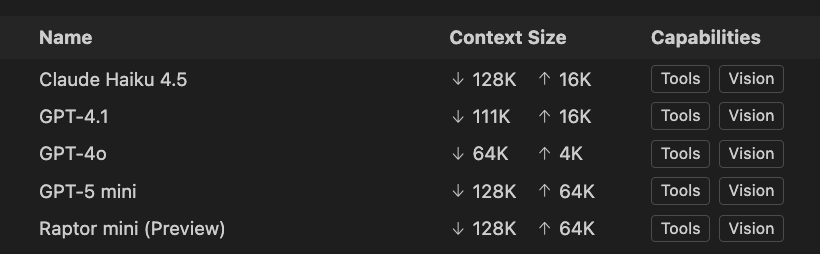
Copilot Limits Are Not Model Limits
Why token windows, quotas, and “rate limits” behave differently than you expect
If you spend time on Reddit or GitHub issues, you’ve probably seen the same complaint over and over:
“I use mostly Sonnet 4, that is capable of processing 200k max tokens (actually 1M since a few days ago).” – user zmmfc on reddit
The short answer is simple:
GitHub Copilot is a product, not an API wrapper.
And once you internalize that distinction, most Copilot “mysteries” stop being mysterious.
Copilot ≠ API access
When people elaborate on model limits, they usually mean API specifications:
- maximum context window
- maximum output tokens
- per-minute or per-day quotas
Copilot doesn’t expose models this way.
Instead, Copilot applies product-level budgets on top of the underlying models. These budgets exist to balance latency, cost, fairness across users (e.g. if a new model is released almost always it is hard to get responses of the model.) and IDE-Specific workflows.
As a result, you can hit Copilot limits long before a model’s theoretical maximum context window is reached.
This is not a bug. It’s a design choice.
Why token usage feels “invisible” in Copilot
Update (February 2026): I will keep the original article, but GitHub CoPilot had been updated to show the context and token usage within the chat. This will most likely make the token usage a bit more obvious for a lot of users.
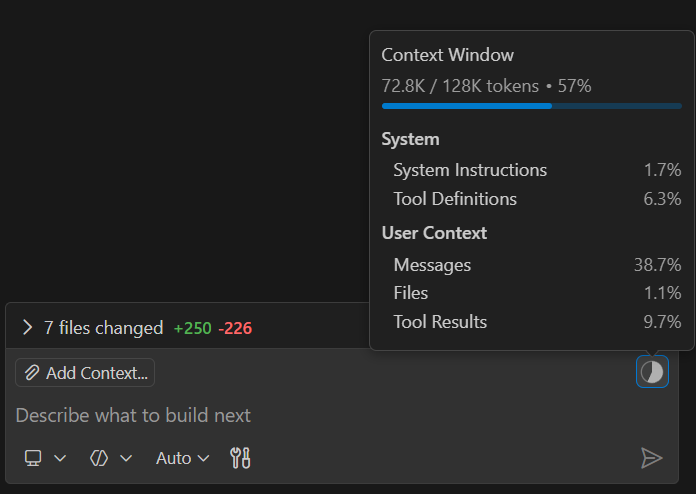
One of the biggest sources of frustration is that Copilot doesn’t show token usage directly. Sometimes you will just see an „error occurred“ message in the CoPilot chat, and looking into the Debug Output, you will have a text telling you that you exceeded your tokens.
From a user’s perspective, a prompt might look small. The output of CoPilot is short, and hitting a limit in those cases feels almost always arbitrary. Especially for those Free Tier users. I have seen both sides of GitHub CoPilot Free Tier (private use) and GitHub CoPilot Enterprise (at work). And I am not talking about the monthly CoPilot usage limits. I mean, on the free tier I could burn through it over a weekend; the other, even if I tried to vibe code everything, I would not even get close to the limit. But that’s a different story.
What’s easy to miss is that your visible prompt is only a fraction of what’s sent to the model. Copilot typically includes:
- system instructions
- editor context (open files, symbols, imports)
- chat history
- tooling and planning metadata
All of that consumes tokens.
Copilot intentionally hides this complexity to preserve flow. The downside is that users build incorrect mental models about what is “cheap” and what is “expensive”.
A useful contrast: the ChatGPT Codex plugin
This is where tools like the ChatGPT Codex plugin are enlightening.
Unlike Copilot, the Codex plugin makes token usage and quotas explicit in the UI:
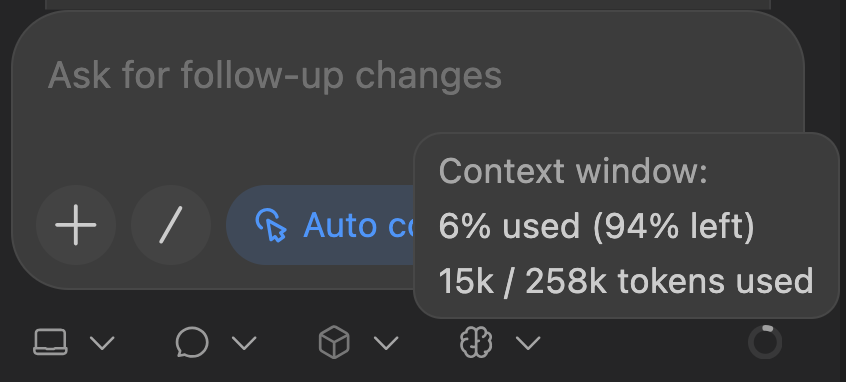
That visibility fundamentally changes how you reason about prompts. Could you imagine that creating a Readme.md file for GitHub for a simple 3-file website project could burn through 15k of tokens?
A concrete example
It’s surprisingly common to see something like this: a small GitHub project with only a few files. A seemingly simple request: “Refactor this module and update the tests.”
Before any code changes are proposed, the plugin already reports ~13,000 tokens consumed.
Nothing unusual happened.
Those tokens were spent on:
- reading file contents
- understanding project structure
- language and framework context
- system instructions
- internal planning
The important realization is this:
Context assembly dominates token usage, not the visible prompt.
Once you’ve seen this happen in a tool that exposes token accounting, Copilot’s behavior starts to make a lot more sense.
Why Copilot feels stricter than “the model”
In Copilot, the same kind of context assembly happens—but silently.
So when Copilot:
- truncates a response
- refuses to continue
- rate limits after several interactions
…it feels inconsistent.
In reality, the budget was already largely spent before you typed the last line.
The Codex plugin teaches intuition by showing the numbers.
Copilot optimizes for convenience by hiding them.
Neither approach is “better.” They optimize for different priorities.
High token limits don’t guarantee better results
Another common misconception is that larger context windows automatically mean better answers.
In practice:
- large contexts increase latency
- irrelevant context adds noise
- reasoning quality can degrade
Many coding tasks benefit more from:
- focused prompts
- staged workflows
- explicit constraints
This is why “smaller but sharper” prompts often outperform massive context dumps.
The Reddit example: headline numbers vs. effective limits
We definitely have improved the context window. I remember a time when you limited the context to the selected lines, because just reading the whole file was already a lot. But back to models that advertise a million tokens, which are a good illustration of how misleading headline numbers can be.
In practice, 1 million tokens would look like:
Gemini API docs – https://ai.google.dev/gemini-api/docs/long-context#:~:text=tokens%2E-,In,episodes
50,000 lines of code (with the standard 80 characters per line)
All the text messages you have sent in the last 5 years
8 average length English novels
Transcripts of over 200 average length podcast episodes
While some Gemini models advertise considerably large context windows, real-world enterprise usage typically operates under much smaller effective usages.
A “1M token model” rarely runs anywhere near that ceiling in practice. Again, this isn’t a model limitation—it’s a product decision.
A note on newer and preview models (like Raptor)
Preview and editor-focused models—such as Raptor in VS Code’s free tier—are interesting not because of raw limits, but because of how they’re tuned. The new Raptor mini model is basically a fine-tuned GPT5 mini by Microsoft.
What makes them stand out is often:
- responsiveness
- context prioritization
- behavior in short, iterative loops
For interactive coding, those traits matter more than headline token numbers. Most Copilot “limit issues” are really context hygiene issues.
Practical ways to avoid hitting Copilot limits
If you frequently run into truncation or rate limits:
- start new chats more often
- split large tasks into phases
- ask Copilot to summarize before continuing
- close irrelevant files and tabs
- explicitly narrow the scope
And if you are still curious like me, just try to run your own local LLM, and you will notice what consuming tokens and what hitting a 4k context window look like. 😉
Further reading (official documentation)
If you want to understand Copilot’s behavior from the official side, these docs are worth bookmarking:
- GitHub Copilot overview
https://docs.github.com/en/copilot - Best practices
https://docs.github.com/en/copilot/get-started/best-practices - CoPilot Rate Limits
https://docs.github.com/en/copilot/concepts/rate-limits
These won’t give you hard numbers—but they explain intent, which is often more important.
Final thoughts
Most Copilot frustration boils down to one misunderstanding:
Model limits describe what a model can do.
Copilot limits describe what a product allows.
Once you separate those ideas, a lot of confusion—and countless online arguments—disappears.
If you need explicit quotas and accounting, use the API.
If you want fast, integrated assistance, accept that Copilot plays by different rules.
And that’s not a flaw—it’s a trade-off.
Disclaimer: This article reflects observed behavior and practical experience. It is not official documentation, and limits, models, and currently the whole AI and GitHub CoPilot are changing so fast that this article may already be obsolete when you are reading it.
Schreibe einen Kommentar